Context Engineering: Everything You Need to Know
Context Engineering: Everything You Need to Know
If you've spent any time building with LLMs (or just following along), you'll have come across prompt engineering. Context engineering is the term that's been replacing it, and once you understand what it covers, you'll see why. Let's dive in.
What is context engineering?
Here's the thing that makes all of this click: LLMs are stateless. Every time you send a request to a model, it starts from absolutely nothing. It doesn't remember your last request, your project, or anything about you.
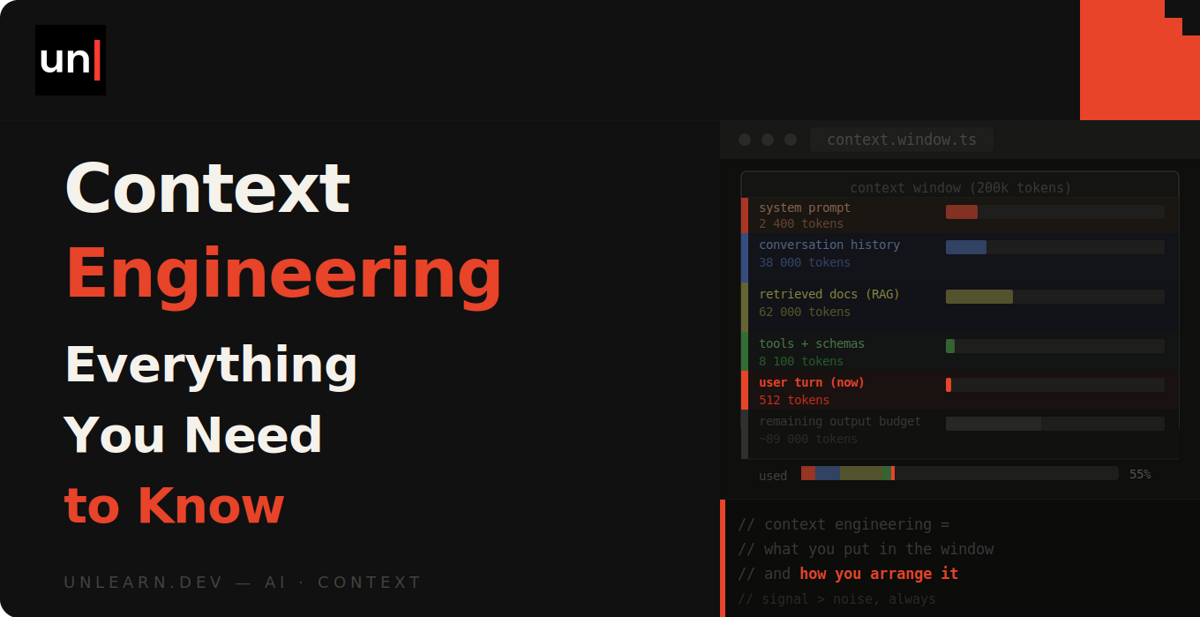
So everything the model needs to know about your task has to be packed into the request itself. That bundle of text (instructions, messages, documents, whatever you decide to include) is called the context window.
Context engineering is the practice of deciding what goes into that window, and just as importantly, what stays out.
A helpful way to think about it: the model's training is everything it learned before you arrived, and the context window is its working memory. It can't learn anything new mid-conversation, but it can work with whatever you load in front of it. Your job is to load the right things.
Isn't this just prompt engineering?
I know what you're thinking. This sounds like prompt engineering with a new coat of paint.
Prompt engineering is about finding the right wording for a message. Phrase the question well, add "think step by step", get a better answer. And when most of us were just typing into ChatGPT, that was it.
But real applications aren't a single message. By the time a request reaches the model, it might contain a system prompt, the conversation so far, chunks of documentation fetched from a database, the results of tool calls, and then your actual question. The prompt you wrote is one slice of a much bigger payload.
The term took off in mid-2025, when Shopify's CEO Tobi Lütke described it as "the art of providing all the context for the task to be plausibly solvable by the LLM", and Andrej Karpathy backed it as "the delicate art and science of filling the context window with just the right information for the next step".
So prompt engineering hasn't gone away. It's just one part of a bigger job: curating everything the model sees, not just the bit you typed.
Why it matters
The obvious reason is that the context window is finite. A couple of hundred thousand tokens sounds enormous until you try pasting a codebase into it. You also pay per token, and the entire context is sent again on every single request, so a bloated window gets expensive quickly.
But here's the more interesting reason: more context isn't better. As the window fills up, models get measurably worse at recalling and using the information in it. This is known as context rot, and it shows up across every major model.
Behind the scenes, this comes down to how transformers work. Every token in the context "attends" to every other token, so doubling the context far more than doubles the work. The model has a finite attention budget, and every token you add spends a little more of it.
So what you put in the window has more effect on the quality of the output than anything else you control. You can give the same model the same question and get wildly different results depending on what surrounds it.
The elements that go into context
The context window gets assembled fresh on every request, and for a typical application, it's built from some combination of the following.
The system prompt
The standing instructions the model receives before any conversation happens: who it is, what it's for, the rules it should follow, and the tone and format it should reply in.
You are a support assistant for Acme, a subscription invoicing app.

- Answer using the provided documentation only
- If the docs don't cover the question, say so and link to support
- Keep answers short
The trap with system prompts is going too far in either direction. A vague one-liner like "You are a helpful assistant" gives the model nothing to work with, while hundreds of lines of brittle rules trying to cover every case fall over the moment something unexpected comes up. Aim for the middle: specific enough to guide behaviour, simple enough to maintain.
Examples
If you want output in a particular style or structure, showing the model what you want works better than describing it. A handful of good, varied examples of input and expected output (known as few-shot prompting) usually does more than a paragraph of instructions.
Quality matters more than quantity here. A few carefully picked examples that cover the edge cases will outperform twenty near-identical ones, which just eat into your window.
Retrieved documents
The model doesn't know your data. It's never seen your docs, your product catalogue or your customers, so if you want it to answer questions about them, the relevant bits have to go into the context.
That's all RAG (retrieval-augmented generation) is: search your own data for the chunks most relevant to the user's question, then include them in the request alongside it.
Use the following documentation to answer the question.

<docs>
Refunds can be issued from the invoice page within 30 days...
</docs>

Question: how do I refund a customer?
The retrieval part (usually a vector or keyword search) is a whole topic on its own, but the principle is simple: fetch a little, and make sure it's relevant. Dumping fifty loosely related chunks into the window is how you end up with vague answers and a big token bill.
Tools and their results
If you're building agents, the model can be given tools: functions it can ask to call, like searching the web, reading a file, or querying your database. Both the tool definitions and every result they return live in the context too.
Tools are interesting because they let the model fetch its own context. Rather than you predicting everything it might need up front, it can go and look. But each tool description takes up space, and a bloated result (say, a query that returns 500 rows) lands straight in the window, so the same discipline applies.
Conversation history
Remember, the model is stateless. That chat interface where it appears to remember what you said earlier? Behind the scenes, the entire conversation is being resent with every message.
That makes history the part of the context that grows quickest, and often the noisiest part too. Failed attempts, dead ends and long tool outputs from twenty turns ago are all still in there, spending your attention budget.
Memory
Since nothing persists inside the model, memory has to be engineered around it. The usual approach is surprisingly low-tech: the model writes notes to a file as it works, and those notes get loaded back into the context in future sessions.
One thing to be clear on, because it trips people up: the model itself never changes. "Memory" is just deciding which text to store outside the window, and when to bring it back in.
Keeping the window under control
Sooner or later a real task outgrows the window, whether that's a long agent session, a big codebase, or research across dozens of documents. Three techniques come up again and again, and Anthropic's guide to effective context engineering covers all of them in depth.
Just-in-time retrieval
Instead of loading everything the model might need up front, give it tools to fetch things at the moment they're needed. It's how you'd work yourself: you don't memorise a codebase before fixing a bug, you know roughly where to look and open files as you go.
Compaction
When a conversation approaches the limit, summarise it and start a fresh window seeded with the summary. Done well, the model keeps the decisions and important details and sheds the noise. Kinda like tidying your desk partway through a project.
Sub-agents
Hand a chunk of work to a separate model instance with its own clean window. It might burn thousands of tokens searching and reading, but only its summary comes back to the main conversation. The detail never clutters the window that matters.
You've already seen this in action
If you've used a coding agent like Claude Code, you've watched all of this happen without necessarily noticing.
The CLAUDE.md file it loads at the start of each session? That's the system prompt and memory elements in one. The way it greps around your project and reads individual files rather than ingesting the whole repo? Just-in-time retrieval. The "compacting conversation" message that appears in long sessions? Compaction, exactly as described above.
None of that lives in the model itself. It's context engineering wrapped around the model, and it's a huge part of why these tools work as well as they do.
Wrapping up
If there's one idea to take away, it's the principle Anthropic lands on in their guide: find the smallest set of high-signal tokens that gets you the outcome you want. Treat the window as scarce, because it is.
And the next time a model gives you a rubbish answer, make your first question "what did it actually see?" rather than "how do I rephrase this?". More often than not, the fix is in the context.